Free digital menu for your restaurant
Take your restaurant menu digital in minutes, with no apps. Generate a QR code for your tables and your customers will always see every dish up to date.
See a sample menu- No credit card
- Unlimited categories and dishes
- QR code ready in seconds
What is a QR code digital menu?
A QR code menu is the digital version of your restaurant menu: customers open it on their phone by scanning the QR code on the table. It replaces the paper menu with an interactive online menu that never needs printing, and every change goes live at once. With Hola Carta you create it for free and your customers always see the right information.
Why switch to a digital menu?
More and more restaurants in Spain are dropping the paper menu. The first benefit is saving money and work: no more paying the printer every time prices go up or you add a new dish. You change the details in the dashboard and your customers see the update straight away.
It is also more sustainable, because you use less paper and plastic, and more convenient for your customers: they scan the QR code on the table, browse the dishes with photos and decide what to order without waiting for the waiter.
From the dashboard you control everything customers see on their phone: dishes, prices, allergens, and your address and phone number.
For restaurants, bars, cafés and hotels
It works for any hospitality business: a tapas bar, a neighbourhood café, an ice-cream parlour, a food truck or a venue with several dining rooms.
- A tapas bar uses it to show the day’s raciones and update them with the season.
- A café shows each category at its own time of day: breakfast in the morning, afternoon snacks later on.
- A restaurant with a set lunch menu changes the dishes first thing in the morning from a phone.
- A hotel puts the same QR code in the rooms and in the restaurant, and guests always see the current menu.
Start with your menu in one language and add more whenever you like, at no extra cost: tourists read it in their own language. With the information always up to date you avoid complaints, and waiters don’t have to explain what has changed.
It is easy to use and you need no design skills: open the dashboard, type in what you offer and it is online. If you like, you can keep the printed menu while you try the service.
How it works
Create your digital menu in three steps
Sign up for free
Create a free account and you can start building your menu in under a minute.
Build your menu
Add your whole menu with photos and prices: it takes just a few minutes.
Share the QR code
Download the QR code, print it and place it on every table.
Features
Everything your digital menu includes
Multilingual
Translate your dishes into English, French, German, Italian, Portuguese and Russian: every customer reads the menu in their own language and orders with confidence.
- Español
- English
- Français
- Deutsch
- Italiano
- Português
- Русский
Import your menu with AI
Have a paper menu? Take a photo and the AI creates the categories and dishes automatically. Then check the prices, because the AI can make mistakes.
Quality photos
Upload your own photos or start from our catalogue of over 160 typical Spanish dishes, with descriptions and allergens already filled in.
Instant changes
Update prices or dishes in seconds, without reprinting the menu.
Unlimited categories
Unlimited categories and dishes, with no ads.
Allergens
Mark the allergens in each dish from a list of the 14 in Regulation (EU) No 1169/2011.
Just a phone
Customers scan the QR code with their camera: it opens instantly on iOS and Android phones, with no app to install.
Customisation
Choose your menu design and add your venue’s name: a professional look of your own without hiring a designer.
Printable PDF menu
Download your menu as a PDF with the same information as the QR menu, in A4 or A5 and in up to two languages.
Sold-out dishes
Run out of a dish? Hide it with one click and the menu stops showing it until it is back.
Visit statistics
See how many visits your menu gets, the busiest hours and the most viewed dishes. These figures tell you what works.
Real example
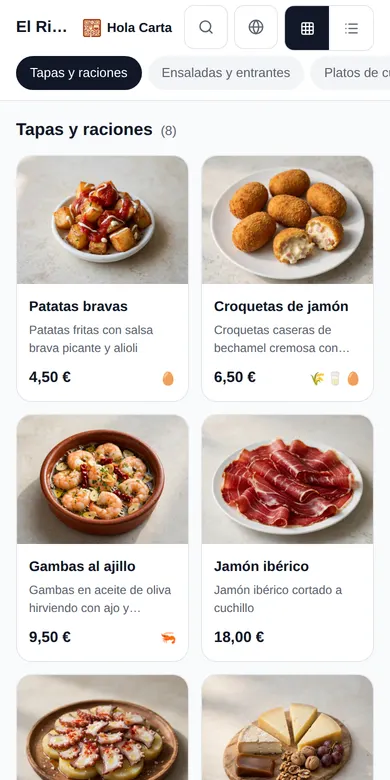
See what a menu made with Hola Carta looks like
Try the sample menu of a tapas bar in each design and pick the one that suits your venue best: the change shows instantly.
Modern 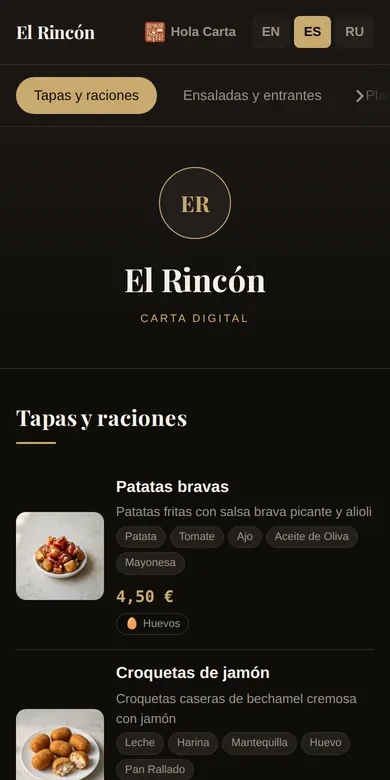
Elegant 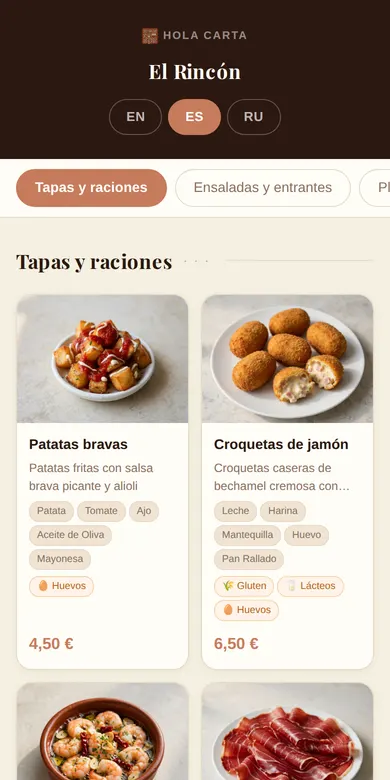
Warm 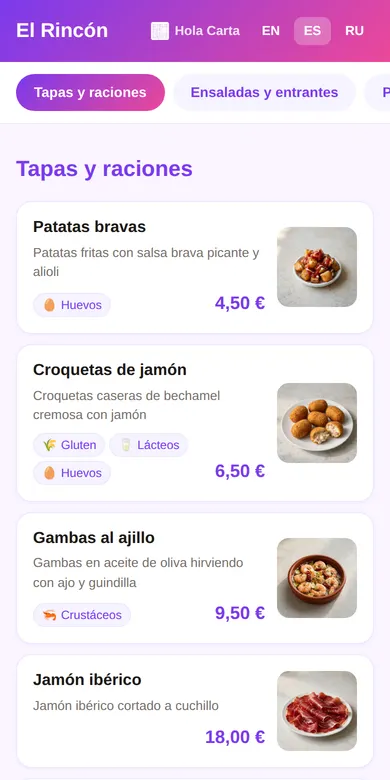
Vibrant 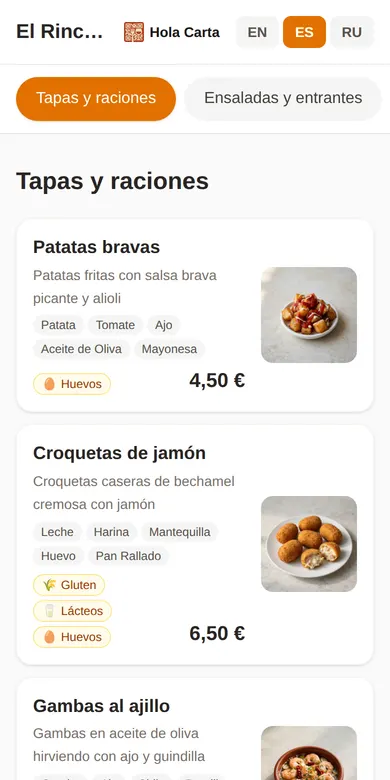
Classic
Where to put your menu’s QR code and link
Tables and bar
Table stands or stickers with the QR codes. Print them once and they work forever.
Google Maps
Add your menu link to your Google Business Profile so customers see it before they arrive.
Tripadvisor
Add it to your listing so tourists can see your dishes before they visit.
Your website and social media
A “See menu” button on your website and the link in your Instagram bio.
Our offer
One simple price: free
Completely free: no subscriptions, no credit card and no small print. Many free digital menus limit the number of dishes or languages; Hola Carta gives you every tool at no cost, including translation into seven languages.
À la carte, set lunch menu or special event menus: add as many categories as you want, at no extra cost.
Free forever
0€
/ month, no strings attached
- Menu of any size
- Good-quality images
- QR code in PNG, ready to download
- Menu in 7 languages
- Allergens for every dish
- Instant updates
- Watermark: never
- Email support
Help
Frequently asked questions about digital menus
How do I make a digital menu for my restaurant?
Sign up for free at Hola Carta, add your dishes with photos and prices, and in a few minutes your QR code is ready. It is quick and easy: you print the QR code once and later changes appear on their own.
How much does a QR code digital menu cost?
With Hola Carta, nothing: it is free forever, with no credit card, no limit on dishes or categories and no ads.
Where can I get a free QR code for my restaurant menu?
The QR code is generated automatically when you create your digital menu. You can download it as a PNG or prepare A4 posters, table cards and stickers for printing straight from the dashboard, at no extra cost.
Can I change the digital menu whenever I want?
Yes. You can change prices, dishes or allergens at any time, and customers see the changes instantly, without reprinting anything.
Do my customers need to download an app?
No. They use their phone camera and the menu opens in the browser, with no app to install and no sign-up.
Is the dashboard available in English?
Yes. The dashboard can be used in Spanish, English or Russian, and your menu can be shown to customers in seven languages.
Can I download my menu as a PDF?
Yes. From the dashboard you download a print version with the same content customers see on their phone, in A4 or A5. Hola Carta is not a POS and does not send orders to the kitchen: it is your menu, always up to date.
Does the digital menu meet allergen rules?
Yes. For each dish you mark which of the 14 allergens in Regulation (EU) No 1169/2011 it contains, and customers see them clearly.
Will I have to pay at some point?
There is no paid plan today: the free version is already complete. If anything changes, we will let you know well in advance.
What if I have questions?
Message us on WhatsApp or through the contact page: our own team answers, not an outside provider.
Missing something in Hola Carta? Tell us on the contact page: user ideas shape the next features.
Ready to take your menu digital?
Join the restaurants already trying Hola Carta. Free. Really.